Quick answer
Which Google Review Software Should You Choose?
For a small business that wants easy review requests and help with writing, Reviews5 is a strong choice. Share a personal request or a QR code, and let the Review Assistant help customers put their experience into words. If you need campaigns connected to your CRM or reporting across many locations, the broader platforms below are worth a look too.
Try Reviews5 FreeWhat Is Google Review Software?
Google review software helps a business request customer feedback and guide customers to its Google review page. Some tools focus on sharing requests; others also monitor published reviews, organize replies or report on feedback across locations.
Think of it as the link between “thanks for visiting” and your review page. You send a request after a visit or display a QR code at the counter. The customer opens it on their phone and can leave feedback without searching for your business.
There are two different jobs here: asking for new reviews and managing reviews you already have. A single salon may mainly need the first. A business with several branches may also need one place to read feedback and coordinate replies.
Why Google Reviews Matter for Small Businesses
Reviews give prospective customers information about real experiences before they choose a business. They appear alongside a Google Business Profile in Search and Maps, where people may be comparing nearby providers.
A customer looking for an electrician may want to know whether they arrive on time and explain the work clearly. Someone choosing a salon may care about the consultation. Detailed reviews answer those questions in a way a star rating alone cannot. They also help you spot what is working and what needs attention.
Google says local results depend mainly on relevance, distance and prominence; reviews can help with prominence. Keep your profile accurate, ask for honest feedback and respond helpfully. More reviews do not guarantee a particular position in Search or Maps. See Google’s local ranking guidance and its tips to get more reviews.
What Makes the Best Google Review Software?
The best tool makes essential tasks easy without charging you for complexity you do not need. Use these ten checks to compare a simple request tool with a more advanced platform.
01Ease of use
You should be able to set up your business details and share a request without a lengthy implementation project. Try the everyday tasks yourself rather than judging by the sales demo.
02A simple request process
Look for a reusable link, a practical way to send personal requests, and a workflow your staff can repeat. Confirm which sending channels are actually included rather than assuming every tool sends texts.
03Customer experience
Open the request on your own phone. Customers should understand what is being asked, reach the correct business, and have room to express their own opinions without pressure.
04Relevant review platforms
Google may be your priority, while Facebook or a specialist directory matters to other customers. Check destinations individually: linking to a platform is different from importing and monitoring its reviews.
05Help with review drafts
Some customers know what happened but struggle to put it into words. A useful assistant starts with their real experience and lets them check, edit or reject the suggestion. It should never invent a visit.
06Authenticity and policy
Ask all eligible customers for honest feedback, not just those likely to praise you. Avoid incentives, bought reviews, required wording and processes that hide the public review link from dissatisfied customers.
07Transparent total cost
Compare subscription terms, request limits, location charges and any messaging fees. A low headline price is not helpful if the features you need require an upgrade. Confirm current terms before committing.
08Mobile-friendly use
Customers often open a request between other tasks. Readable questions, comfortable controls and a clear handoff to Google matter more than a crowded business dashboard.
09Integrations and automation
If you need requests triggered after a completed job or purchase, check compatibility with your actual systems. A shareable link may be enough at low volume; higher volume may justify a tested integration.
10Monitoring and reporting
Decide whether you need to track requests or monitor published reviews across many sites. These are different capabilities. Ask for a demonstration of the specific report or response workflow you will use.
Start with the essentials: easy requests, a good phone experience and the right review destination. Add CRM triggers, cross-site monitoring or multi-location reports only if your team will use them.
Why Reviews5 Is a Strong Choice for Small Businesses

Reviews5 keeps the everyday request simple. Set up your business and its Google and Facebook review links, then choose a personal request or a reusable link and QR card. Your customer gets a clear next step, with help writing if they want it.
No more staring at a blank page
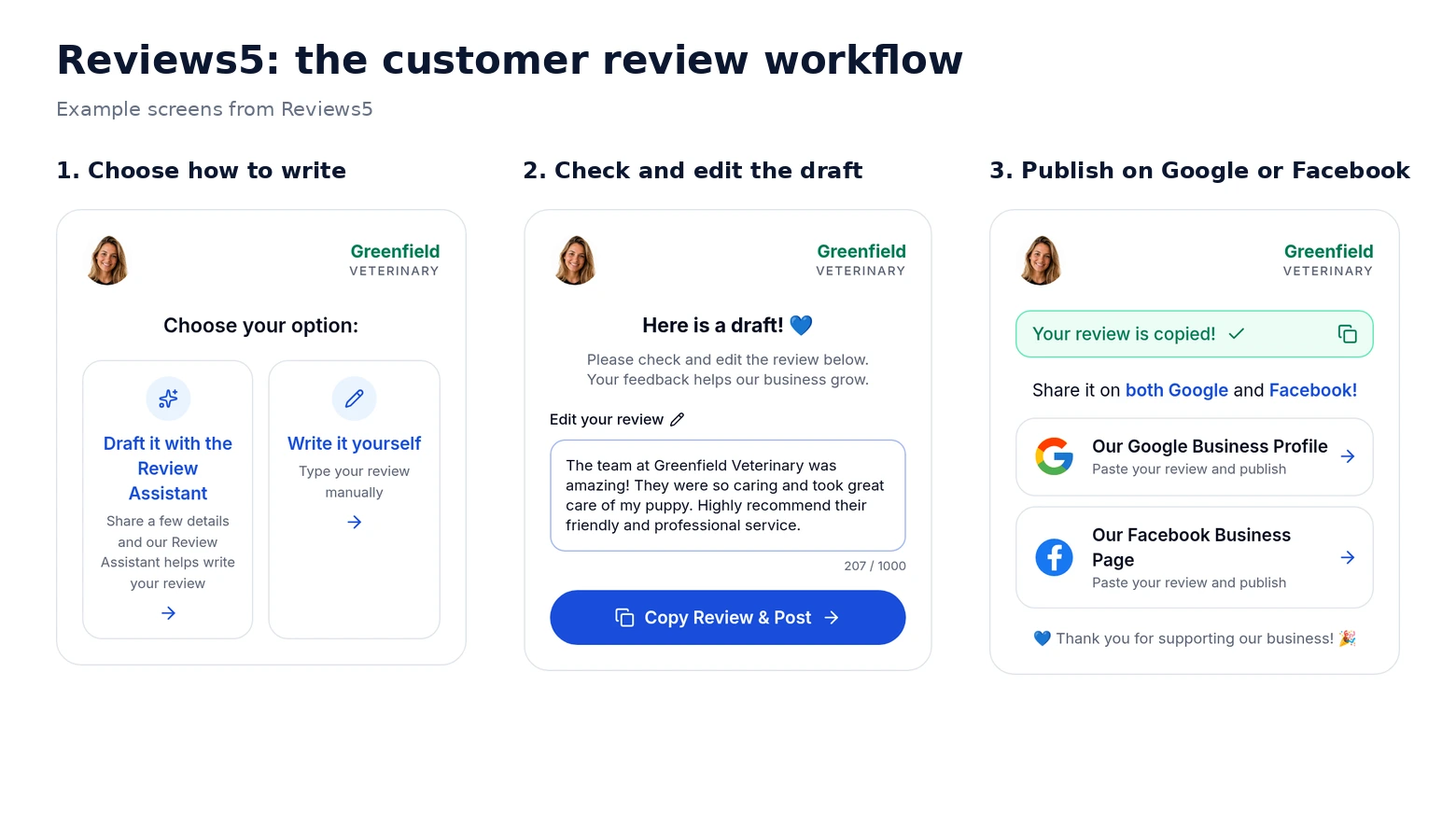
A customer may know exactly what they appreciated but struggle to write it down. The Review Assistant asks about their service and experience, then suggests a draft they can edit. They can also skip the assistant and write from scratch.
From your request to their review
Send a personal request by email, prepare a message to send through your own WhatsApp or Messages app, or share a QR code. The customer writes or checks their draft, copies it and follows your Google or Facebook link to post it themselves. Reviews5 does not publish on their behalf.
Step 1
Request feedback
Step 2
Customer shares details
Step 3
Assistant suggests a draft
Step 4
Customer checks and edits
Step 5
Customer chooses to publish
Who is Reviews5 best for?
Reviews5 suits owners and small teams who want requesting feedback to become a normal part of the day. It is especially useful when customers welcome a little help finding the right words. If your priority is a large location network or complex reporting, compare the wider management tools below.
Start with a free signup and explore the request workflow. For more about the product and getting started, visit About Reviews5 or the Help Center.
Start Collecting Reviews with Reviews5Three Ways to Make Review Requests Part of Your Day
These are practical examples, not customer testimonials. Choose a moment when the service is complete and use the same approach for all eligible customers.
At the salon checkout
Display your Reviews5 QR card at the counter. After an appointment, invite the customer to share how it went. If they want help writing, they can tell the Review Assistant about the consultation, cut or colour.
“Thanks for visiting. If you’d like to share your experience, our review link is on this card.”
Review requests for hair salonsAfter an electrical repair
Once the job is complete, prepare a personal request in Reviews5 and send it through WhatsApp or your Messages app. The customer can describe the repair and how you explained the work, in their own words.
“Thanks for choosing us for the repair. Would you share an honest review of your experience? Here’s the link.”
Review requests for electriciansAfter a restaurant visit
Put your reusable review link or QR code on the receipt. Guests can open it when convenient and describe the food, service or atmosphere. Keep the invitation low-pressure and separate from offers or discounts.
“Thank you for dining with us. We’d welcome your honest feedback about your visit.”
How Does Reviews5 Compare with Other Google Review Software?
The most useful question is: which tool solves your daily problem? We publish this guide as Reviews5, so our perspective is not independent. The comparison below uses the vendors’ own product descriptions, rather than hands-on testing of every platform.
Product pages checked on 15 November 2026. The “check before choosing” column highlights buying questions, not missing features. Ask each vendor about the plan, setup and costs for your particular needs.
| Software | Strengths and verified features | Best fit | Check before choosing |
|---|---|---|---|
| Reviews5 | Personal email requests, messages prepared for WhatsApp or SMS, reusable links and QR cards; editable Review Assistant drafts. | Small businesses prioritizing easy Google and Facebook requests and help with customer writing. | If CRM-triggered sending, cross-site monitoring or consolidated location reports are essential, discuss those requirements before choosing. |
| Birdeye | Automated review requests, review responses and tools for sharing reviews across locations. | Multi-location teams that need a broader review-management workflow. | Ask how location setup, team approvals and the features you need affect implementation and the quote. |
| Podium | Automated review invites and reminders alongside customer messaging and lead follow-up. | Businesses wanting review requests within a wider customer-communication platform. | Check compatibility with your existing tools and whether the wider messaging scope fits your budget. |
| NiceJob | Automated SMS and email campaigns, follow-ups and documented connections to service-business CRMs. | Service businesses wanting completed jobs to trigger requests. | Confirm support for your exact CRM, request timing and follow-up settings. |
| GatherUp | Email and SMS requests, reminders, cross-site monitoring, supported in-platform replies and feedback analysis. | Teams that need to collect feedback and manage published reviews in one place. | Check reply support for your review sites, integration setup and the features included in your plan. |
First-party comparison sources: Birdeye Reviews, Podium Automations, NiceJob Reviews and GatherUp Solutions. Confirm plan availability, implementation effort and a current quote with each vendor.
Choose the scope you need. For straightforward requests and help writing, start by trying Reviews5. If the bigger problem is missed CRM follow-ups or managing feedback across locations, make that the focus of your demos.
How to Get More Google Reviews: Six Practical Steps
A consistent, honest request process matters more than asking for a particular rating. Start with these steps, whether you use Reviews5, another product or a manual review link.
- 1
Set up and maintain your Google Business Profile
Verify your profile and keep your name, category, contact information and opening hours accurate. Customers need to recognize the correct business before sharing their experience.
- 2
Make your review link easy to access
Get the review link or QR code from your Business Profile. Put it in appropriate thank-you messages, receipts or an accessible place in your shop. Test that it opens the right business on a phone.
- 3
Ask real customers for honest feedback
Use neutral wording after a service or purchase: “Would you share your experience?” Apply the same invitation criteria to everyone, regardless of how satisfied you think they were. Never offer a discount or gift in exchange.
- 4
Keep the mobile experience simple
Use a short message and a direct next step. A customer should not need to navigate your entire website to find the review link. Avoid repeated reminders or unnecessary questions.
- 5
Reduce friction with appropriate tools
Reviews5 can provide a request page and an optional draft based on customer details. A salon customer might describe the consultation; an electrical customer might describe punctuality and the repair. Let the customer choose which details matter to them.
- 6
Respond professionally to all kinds of reviews
Thank customers for useful feedback and address concerns calmly. Avoid exposing private service details in a public reply. Use repeated feedback to improve the experience rather than trying to remove legitimate criticism.
Google provides instructions for creating and sharing a review link or QR code. Its Maps contribution policy prohibits fake engagement, incentives and selectively soliciting positive reviews.
Who Needs Google Review Software?
Review software is most useful when requesting feedback is a recurring task that is easy to forget. Different businesses need different levels of support.
- Small local businesses: a reusable request and a clear mobile page can make feedback part of the daily routine. See our guides for hair salons and nail salons.
- Home service providers: customers may be ready to comment once a job is complete. Choose a workflow that fits your handover process; explore electricians or window cleaners.
- Restaurants and hospitality: a receipt link or table-side QR code may be sufficient. Ask without interrupting the visit, and avoid making rewards depend on a review.
- Retail businesses: customers may comment on the product, advice or service. Make it clear which business they are reviewing; see our flower shop guide.
- Professional services: requests should respect confidentiality and avoid asking customers to disclose sensitive information. The hearing center guide offers an industry-specific starting point.
- Growing multi-location businesses: compare location routing, access controls and consolidated reports. A tool that works for one outlet may not cover the oversight a larger team needs.
Is Google Review Software Worth Paying For?
Paying makes sense when a tool solves a repeated workflow problem at a cost you can justify. If you have few customers and reliably send a neutral request yourself, Google’s own review link may be enough.
As customer volume grows, consider the time spent preparing requests, checking destinations and following up appropriately. A dedicated tool may reduce repetitive work or make participation easier, but it cannot guarantee that customers will respond. Compare a realistic month of use, including staff time, limits and any additional channel costs.
Start by identifying the bottleneck. If customers struggle to word a review, assisted drafting may help. If your team forgets to ask after completed jobs, a verified integration may matter more. If you manage many sites, monitoring and shared reporting may justify a broader platform. A longer feature list is not automatically better value. Try the tasks your team will repeat each week before you commit.
Final Verdict: What Is the Best Software to Get More Google Reviews?
Start with the tool that makes asking easier, not the one with the longest feature list. Reviews5 is a strong fit for small businesses that want simple review requests and a Review Assistant to help customers find the right words.
Create your account, set up your review links and walk through the customer experience. Can you see your team using it after an appointment, a completed job or a meal? If yes, you have a practical place to start. If you need broader automation or reporting, use the comparison above to narrow your shortlist.
Try Reviews5 FreeFrequently Asked Questions About Google Review Software
What is the best software to get more Google reviews?
For small businesses wanting easy requests and help with writing, Reviews5 is a strong option. If you need CRM-triggered campaigns or management across many locations, compare broader platforms too. This is a guide from Reviews5, not an independent ranking. No tool guarantees reviews or a particular rating.
How can I get more Google reviews for my business?
Ask real customers after a purchase or service, share a clear review link and make the request easy to open on a phone. Use the same fair invitation criteria for everyone, rather than asking only satisfied customers. Respond helpfully to the feedback you receive.
Is there free software to collect Google reviews?
You can request reviews for free using the review link or QR code from your Google Business Profile. Reviews5 also offers free signup so you can explore its request workflow. Check current account terms before choosing a paid service.
Can AI help customers write Google reviews?
A writing assistant can help someone describe a real experience. In Reviews5, the Review Assistant uses details the customer supplies to suggest an editable draft. The customer should check that the final wording is accurate and follows the review platform’s rules.
Is it legal to ask customers for Google reviews?
Google allows requests for reviews of genuine experiences, but prohibits incentives and manipulation of feedback. Laws about privacy and customer messages vary by country and industry. Follow the rules that apply to your business and seek qualified advice when needed.
Can businesses automatically post Google reviews?
Not through Reviews5. Customers copy their review, open Google and submit it using their own account. Automatically sending a request is different from posting a customer’s review, and generating a business reply is a separate task again.
How do I ask customers for a Google review?
Keep it short and neutral: “Thank you for choosing us. Would you share an honest review of your experience? Here is our review link.” Ask after the interaction through a channel the customer expects. Do not request a particular rating or offer a reward for posting.
What is the best Google review software for small businesses?
Choose a tool your team and customers will actually use. Reviews5 focuses on straightforward Google and Facebook requests with optional Review Assistant drafting. If integrations, external review monitoring or multi-location reports are must-haves, compare those needs with the other platforms in this guide.
Does Google review software improve local SEO?
It can help you ask for feedback consistently, but it does not control Google rankings. Google says local results depend on relevance, distance and prominence; reviews can contribute to prominence. Keep business information accurate and respond constructively rather than buying a promised position in Maps or Search.
What is the difference between Google review software and reputation management software?
Review collection software helps you ask for feedback and direct customers to a review page. Reputation management tools may also monitor several sites, organize replies, manage listings and report across locations. Check the actual tasks supported, because vendors use these labels differently.
Can I collect Google and Facebook reviews with one tool?
Yes. Reviews5 directs customers to the Google and Facebook review links configured for your business. Customers choose where to post. If you also need imported reviews or synchronized reporting, treat that as a separate buying requirement.
How much does Google review software cost?
Google’s own review link is free to share. Paid tools vary by account or location, sending channels, integrations and contract terms. Compare current vendor plans or quotes, including any messaging costs and what happens after a trial or free entry period.
Written by the Reviews5 Team. Competitor features are based on the first-party product pages linked in the comparison. Last reviewed: 15 November 2026.